FourIA — Development Guide
On this page
Comprehensive onboarding guide for developers and AI agents working on the FourIA platform.
See VISION.md for product vision, CONTRIBUTING.md for contribution rules, and ENV-VARIABLES.md for environment variable reference.
Project Map
FourIA is a managed, private agent orchestration runtime that turns markdown-based AI agents into operational systems. The monorepo is organized into four top-level directories:
| Directory | Purpose |
|---|---|
apps/ | Cloudflare Worker applications (Tenant + Dashboard) |
workers/ | Infrastructure Workers (Dispatch, Outbound) |
packages/ | Shared libraries (moltlazy, plugins) |
webs/ | Static websites (Paso4 marketing homepage) |
Component Reference
apps/fouria/ — FourIA Tenant Worker
| Field | Value |
|---|---|
| Package | moltbot-sandbox |
| Description | Per-customer Worker managing OpenClaw in a Cloudflare Sandbox container |
| Runtime | Cloudflare Workers (Hono 4) |
| Frontend | React 19 SPA (Vite 6), served from /_admin/ |
| IaC | wrangler.jsonc + OpenTofu (iac/) |
| Key deps | @cloudflare/sandbox, @cloudflare/puppeteer, moltlazy (workspace), openclaw (catalog), jose, react-router-dom |
Purpose: This is the core component of FourIA. Each tenant gets a dedicated Worker instance that provisions, manages, and proxies to an OpenClaw gateway running inside a Cloudflare Sandbox container. It provides:
- OpenClaw gateway lifecycle (start container, onboard, config patch, launch)
- HTTP/WebSocket proxy to the gateway on port 18789
- Admin dashboard at
/_admin/for device pairing, configuration, secrets, integrations - REST API at
/api/*wrapping OpenClaw CLI calls - Debug endpoints at
/debug/*(ROOT role + DEBUG_ROUTES only) - Multi-tenant isolation via
CustomerRegistryDO - Cost observability via Analytics Engine + OTel metrics
Key files:
| File | Role |
|---|---|
src/index.ts | Main Hono app: middleware pipeline, route mounting, WS proxy |
src/gateway/process.ts | Container lifecycle: find, start, restart, destroy |
src/gateway/env.ts | Builds env vars passed to the container |
src/auth/ | Cloudflare Access JWT auth + RBAC (ROOT/ADMIN/BASE_USER) |
src/routes/api.ts | API route aggregator — delegates to domain modules |
src/routes/admin-ui.ts | Serves React SPA from /_admin/* |
src/routes/debug.ts | Debug endpoints (process listing, CLI execution, env inspect) |
src/services/fouria-docs/ | Dev-only per-tenant client docs (R2 store + materialization) |
src/client/ | React SPA (pages/, components/, hooks/) |
start-openclaw.sh | Container entrypoint: onboard → moltlazy patch → start gateway |
Dockerfile | Sandbox container image (Node 24 + OpenClaw + cloudflared + cctr) |
Development commands:
# Frontend hot-reload (Vite dev server on port 8787)
bun run dev

# Backend worker (wrangler dev on port 8788) — run in another tab
bun run dev:worker

# Full local start (build all + wrangler dev)
bun start
Note: Frontend changes hot-reload. Backend changes require re-running
bun run dev:worker.
See: apps/fouria/docs/WORKER-DEVELOPMENT.md for deep-dive architecture guide.
apps/lerma/ — Customer Dashboard
| Field | Value |
|---|---|
| Package | lerma |
| Description | Billing/subscription dashboard and CustomerRegistry DO |
| Runtime | Phoenix 1.8 (Elixir) + Hono Worker (TypeScript) |
| Frontend | Phoenix LiveView 1.1 (Tailwind CSS) |
| Database | PostgreSQL (Ecto) + Cloudflare D1 |
| IaC | Phoenix deployment + Cloudflare Worker bindings |
Purpose: Two-in-one app:
- Phoenix backend — Serves the billing/subscription management UI via LiveView. Manages clients, instances, agents, channels, costs, knowledge bases.
- Worker portion — Hono API Worker interacting with D1 database for CustomerRegistry operations.
The Applications catalog (Lerma.Applications) supports per-application logo uploads (max 1 MB, ROOT-only) stored as a binary in the applications table and served at GET /dashboard/applications/:id/logo.
Key directories:
| Directory | Purpose |
|---|---|
lib/lerma/ | Business logic (billing, agents, channels, clients) |
lib/lerma_web/ | Phoenix web layer (LiveView, controllers, components) |
lib/lerma_web/live/ | LiveView pages (client, dashboard, instance, home) |
src/ | Worker portion (Hono routes, DO bindings) |
migrations/ | D1 SQL migrations |
workers/fouria-dispatch/ — Dispatch Worker
| Field | Value |
|---|---|
| Package | fouria-dispatch |
| Description | Routes *.fouria.io wildcard requests to correct tenant |
| Runtime | Cloudflare Workers (Hono 4) |
| Tech | KV caching, D1 tenant lookup, Dispatch Namespace, CF Access JWT |
| IaC | wrangler.jsonc |
Purpose: The entry point for all tenant traffic. Extracts tenant slug from subdomain (e.g., acme.fouria.io → acme), resolves the tenant from D1/KV, applies plan-based CPU limits, and dispatches to the tenant Worker via Cloudflare Dispatch Namespace.
Key files:
| File | Role |
|---|---|
src/index.ts | Main handler: slug extraction, tenant resolution, dispatch |
src/auth.ts | CF Access JWT verification for dashboard redirects |
wrangler.jsonc | KV (TENANT_INDEX), D1 (DB), Dispatch Namespace |
Development:
bun run test:dispatch          # Unit tests
bun run deploy:dispatch        # Deploy to production
bun run deploy:dispatch:staging # Deploy to staging
Request flow: User → Dispatch Worker → Tenant Worker → AI Gateway → Upstream LLM
workers/fouria-outbound/ — Outbound Worker ⚠️ NOT SUPPORTED
Deprecated. PII filtering is handled natively by Cloudflare AI Gateway. This worker and the Presidio container are no longer required. See Cloudflare AI Gateway docs.
packages/moltlazy/ — Config Patcher + Typed RPC Client
| Field | Value |
|---|---|
| Package | moltlazy (v0.4.0) |
| Description | OpenClaw config generation ($include) + typed RPC client |
| Runtime | Node.js ESM (CLI tool), Bun for testing |
| IaC | N/A — internal library |
Purpose: Two systems:
-
Config Module (
src/config/+cli.ts): Generates per-section include files (moltlazy-session/tools/logging.json) at container startup. Uses OpenClaw’s$includedirective as per-section single-file includes (never a root$include) for immutable, idempotent config injection. This is the mandatory config system — session, tools, logging (via per-section$include), plus gateway and agent defaults (inline). -
SDK Module (
sdk/): Typed RPC client over the OpenClaw Admin HTTP API. Direct gateway interaction viaPOST /api/v1/admin/rpc. Not integrated in the Worker runtime for v1 — the Worker uses CLI calls instead.
Key files:
| File | Role |
|---|---|
cli.ts | CLI entry point (moltlazy patch / moltlazy validate) |
index.ts | Main config patching logic |
src/config/include.ts | $include injection into openclaw.json |
src/config/gateway.ts | Gateway config section generation |
src/config/session.ts | Session config generation |
src/agents/ | Agent definitions (defaults; premade/prod + premade/dev) |
src/agents/premade/dev/ | Dev-only agents: fouria-builder, fouria-qa (OPENCLAW_DEV_MODE) |
sdk/client.ts | Typed RPC client over Admin API |
sdk/ | Domain modules (agents, channels, config, devices, etc.) |
Dev-only agents and client documentation: when OPENCLAW_DEV_MODE=true,
moltlazy patch also injects Fouria Builder (fouria-builder) and
Fouria Q&A agent (fouria-qa). The Builder reads per-tenant client docs
(the proposal, phases, acceptance criteria) materialized by the Worker from R2
into /home/openclaw/clawd/client-docs/, plus platform docs shipped at
/home/openclaw/clawd/fouria-docs/, and produces a POC + cctr acceptance
corpus under /home/openclaw/workspace/fouria-poc/. The Q&A agent runs cctr
against that corpus. Production ships no premade agents (only main).
Configuration flow:
Worker Request → restoreIfNeeded() → buildEnvVars() → ensureGateway()
                                                                                  │
                                                                     start-openclaw.sh
                                                                                  │
                                                                       moltlazy patch
                                                                                  │
                                                              Generates per-section $include files (session/tools/logging); gateway/agents inline
packages/plugins/cloudflare-unified-billing/ — CF Unified Billing Plugin
| Field | Value |
|---|---|
| Package | @moltlazy/cloudflare-unified-billing (v2026.5.26) |
| Description | OpenClaw provider plugin for Cloudflare AI Gateway |
| Runtime | OpenClaw Plugin SDK (Node.js) |
Purpose: Registers Cloudflare AI Gateway as an OpenClaw provider with full model catalog (40+ models). Routes through the AI Gateway REST API (api.cloudflare.com/.../ai/v1) for unified billing.
Secrets: The plugin’s local .dev.vars (packages/plugins/cloudflare-unified-billing/.dev.vars) is generated by secrets:generate from the secrets registry (docs/schemas/secrets-manifest.schema.json), providing the AI-scoped CLOUDFLARE_AI_GATEWAY_API_KEY, a derived CLOUDFLARE_API_TOKEN for REST requests, and the gateway identifiers. Lerma receives the same AI credential from its generated .env files. See scripts/secrets-generate.ts.
webs/paso4.io/ — Paso4 Marketing Homepage
| Field | Value |
|---|---|
| Package | @paso4/homepage |
| Description | Paso4 marketing website |
| Runtime | React 18 (Vite 6), deployed via Cloudflare Pages |
| IaC | wrangler.jsonc (Cloudflare Pages config) |
Purpose: Public-facing website for Paso4. Uses MUI 7 + Radix UI + Tailwind CSS 4. Not part of the FourIA runtime.
Cloudflare Infrastructure
All Workers use wrangler.jsonc for configuration. Bindings are defined per environment (dev/staging/production).
Bindings Reference
| Binding | Type | Purpose |
|---|---|---|
Sandbox | Container DO | Cloudflare Sandbox container lifecycle management |
GATEWAY_RPC | Durable Object | Admin RPC proxy to OpenClaw gateway (planned — see GATEWAY_RPC issue) |
R2SecretsStore | Class (in-memory) | F4E1-encrypted R2-backed secrets store (replaces UserSecretsStore DO) |
BACKUP_BUCKET | R2 Bucket | Squashfs snapshots for container persistence |
BROWSER | Browser Rendering | Headless browser for CDP automation |
ANALYTICS | Analytics Engine | Cost & usage metrics (dataset: fourai_cost_metrics) |
TENANT_INDEX | KV Namespace | Tenant slug → worker mapping cache (dispatch Worker) |
DB | D1 Database | Client/tenant registry (dispatch Worker) |
IaC (OpenTofu)
The apps/fouria/iac/ directory contains OpenTofu configs for infrastructure provisioning:
modules/access/— Cloudflare Access applicationmodules/ai_gateway/— Cloudflare AI Gatewaymodules/r2/— R2 bucket provisioningmodules/worker/— Worker deployment configenvironments/dev/andenvironments/prod/— Environment-specific vars
Wrangler Commands
| Command | Purpose |
|---|---|
wrangler dev | Local development server |
wrangler deploy | Deploy Worker to Cloudflare |
wrangler tail | Stream live logs from deployed Worker |
wrangler secret put KEY | Set an encrypted Worker secret |
wrangler secret list | List secret names (values not shown) |
wrangler types | Regenerate worker-configuration.d.ts types |
wrangler d1 execute DB --command "..." | Execute SQL against D1 database |
Skills to load:
wrangler,cloudflare,workers-best-practices,durable-objects,sandbox-sdk
Provisioning & Release Lifecycle
Artifacts flow from Cloudflare storage + the container registry to the edge. Lerma never builds — it lists image versions from the registry and pulls the worker bundle from the
fouria-bundlesR2 bucket, then orchestrates the Cloudflare control plane. Read .github/workflows/test.yml (build + bundle validation +unstable-<sha>image push + bundle upload to R2 + e2e), .github/workflows/lerma.yml (lerma CI quality gates only), .github/workflows/deploy-dispatch.yml (dispatch worker deploy) and .github/workflows/deploy-fouria.yml (fourialatestimage promotion + release bundle upload) for the CI/CD side andapps/lerma/lib/lerma/provisioning/tenant_provisioner.exfor the orchestration side.
Release: one tag, two artifacts
Every GitHub Release of the fouria product produces two immutable artifacts:
fouria-bundles:<tag>/fouria.mjs— the multipart Worker bundle (main module + admin-dashboard assets), uploaded to thefouria-bundlesR2 bucket (seetest.yml/deploy-fouria.yml). It is also attached to the GitHub release asfouria.mjs.fouria:{tag}— the sandbox container, pushed to the Cloudflare managed registry (registry.cloudflare.com/{account}).
CI validates the bundle first (every asset referenced by index.js must exist as a multipart part) so broken bundles never ship. Pushes to develop run the build-and-push job (build + bundle validation + fouria:unstable-<sha> image push + fouria-bundles:unstable-<sha>/fouria.mjs upload), then the e2e job consumes that image. On a real release, deploy-fouria.yml rebuilds the image from source and promotes it to latest + fouria:{tag} (and re-uploads the bundle to R2 as <tag> / latest); deploy-dispatch.yml deploys the dispatch worker. Release commits carry [skip ci], so a version bump never re-runs the test suite.
flowchart LR
    A[push develop] --> B[build-and-push]
    B -->|unstable-sha image| S[e2e]
    B -->|unstable-sha bundle| S
    R[GitHub Release] --> C[deploy-fouria promote]
    C --> D[Docker build]
    D --> E[(CF Container Registry<br/>fouria:tag + latest)]
    C --> F[wrangler deploy --dry-run]
    F --> G[(fouria-bundles R2<br/>tag + latest)]
    E --> I[registry.cloudflare.com]
    F --> H[release asset fouria.mjs]
Stable-only production deploys
Production instances may only reference stable release tags (v2026.9.15,
v2026.9.15-1, v1.2.3) — never the mutable unstable-<sha> channel, which the
stale-image cleanup eventually removes. This is enforced in lerma, not just in CI:
Lerma.Cloudflare.ImageRegistry.stable?/1/stable_only?/0classify tags and gate on:cf_environment(staging keeps the full unstable channel).- The instance deploy UI lists stable tags only in production, and
Instances.update_instance_version/3rejects unstable/prerelease versions with{:error, :unstable_version_not_allowed}. - When a production deploy requests
latest,Lerma.Cloudflare.RegistryBundleresolves it to the newest stable bundle infouria-bundles(fail closed when no stable release has been published) instead of the newest object.
The .github/scripts/cleanup-stale-images.sh cron additionally never deletes an
image (or its matching R2 bundle) that any container application still references
— current configuration and every application version, so an in-progress
rollout’s old image is safe. If the in-use set cannot be resolved, a live cleanup
run aborts without deleting anything.
Provision: lerma materializes a tenant
When a client signs up, lerma runs a 10-step, idempotent pipeline (TenantProvisioner). Each step creates one Cloudflare resource — and creates it only once. If step N fails, steps 1..N−1 roll back in reverse order, best-effort and non-blocking.
The version list comes from the registry catalog (ImageRegistry), and the bundle is pulled from the fouria-bundles R2 bucket at step 4 (RegistryBundle), then uploaded as a WFP dispatch-namespace script together with a container application tying the Sandbox DO to the released image. Secrets ride as secret_text bindings: per-tenant ones are generated at provision time (MOLTBOT_GATEWAY_TOKEN, CDP_SECRET, BACKUP_ENCRYPTION_KEY); the AI credential is copied from Lerma’s environment and exposed under both the native-provider and REST-transport names. No secrets ever touch the bundle.
flowchart TD
    A[1 · ai_gateway<br/>create fouria-slug AI Gateway] --> B[2 · access_policy<br/>per-environment Access app + closed group]
    B --> C[3 · r2_bucket<br/>create fouria-backup-slug]
    C --> D[4 · fetch_bundle<br/>pull fouria-bundles:tag from R2]
    D --> E[5 · dispatch_deploy<br/>upload Worker into dispatch namespace]
    E --> F[6 · worker_tags<br/>customer_id · plan · env]
    F --> G[7 · create_instance<br/>DB record + BACKUP_ENCRYPTION_KEY]
    G --> H[8 · invalidate_cache<br/>bust dispatch lookup]
    H --> I[9 · health_poll<br/>wait for GET /health 200]
    I --> J[10 · production_transition<br/>client to production]

    E -.-> E1[multipart upload<br/>index.js + assets]
    E -.-> E2[container app<br/>Sandbox DO to CF registry image]
    E -.-> E3[bindings<br/>secret_text secrets · vars · R2 · Analytics · Browser]

    R1[rollback: delete gateway] -.-> A
    R2[rollback: delete access policy] -.-> B
    R3[rollback: delete r2 bucket] -.-> C
    R5[rollback: delete worker script] -.-> E
    R7[rollback: delete instance record] -.-> G

    style J fill:#d3f9d8,stroke:#2f9e44
The step 2 Access application is per-environment: the access slug carries the platform prefix (staging-acme.fouria.io in the staging lerma, acme.fouria.io in production), and each app carries two allow policies — the closed Client Users - {access-slug} group plus the shared Paso4 Root Users group. Both are required because Cloudflare matches a request to the most specific application domain: once a host has its own app, it no longer falls back to the wildcard *.fouria.io platform app that root users normally use. The group is seeded with the client’s validated user emails, so a reprovisioned client (e.g. revived after decommissioning) keeps its existing users; users still need a fresh instance invitation for Dispatch RBAC, since instance associations cascade away with the old instances.
Invite: verify and scope client users
Lerma’s client page invites users only after an instance exists. One invitation can select multiple instances, including production and dev or instances belonging to different applications. The lifecycle is:
invite_user/2storesstatus = invited, a SHA-256 token hash, a seven-day expiry, and rows inclient_user_instances; the raw token exists only in the email.- The confirmation email is delivered from a supervised background task (
Lerma.Invitations) — never inside the request or the database transaction. A slow or failing SMTP relay can neither hold a Postgres connection, block the dashboard, nor roll the invitation back; the outcome is broadcast over PubSub and the client page alerts the operator with a toast plus a per-user delivery badge. - No Cloudflare Access synchronization occurs while the user is pending.
- The public
/invitations/:tokenpage lets the recipient accept or reject. - Acceptance records the verified Cloudflare Access email identity, sets
status = validated, and syncs only selected instance groups. - Dispatch independently requires both
client_users.status = validatedand a matchingclient_user_instances.instance_idbefore forwarding an RBAC role.
Each client environment has a separate Access hostname/group: {slug}.fouria.io for production and {slug}-dev.fouria.io for dev (with the platform staging- prefix in staging). Access app reconciliation replaces misconfigured everyone policies with the matching group-only allow policy, and re-adds the shared root-group policy so root operators keep access.
Update: swap code, keep the tenant
Upgrades are a subset of the pipeline (@upgrade_pipeline): re-fetch → re-deploy → tags → update instance → invalidate cache → health poll → transition. They never re-run the infrastructure steps, and they preserve existing secrets via keep_bindings on the re-upload.
The zero-downtime trick: the running container keeps serving on the old image until its next cold start. The deploy replaces the script and the container-application image reference — live requests are unaffected. The health poll gates the final transition, so a broken release fails fast while the previous code stays intact.
sequenceDiagram
    participant L as Lerma
    participant G as GitHub Releases API
    participant CF as Cloudflare API
    participant W as Tenant Worker
    participant C as Sandbox Container

    L->>G: GET latest release → fouria.mjs + manifest
    L->>CF: PUT script (keep_bindings: secret_text, plain_text)
    L->>CF: update container app image
    L->>CF: PUT worker tags
    L->>L: update instance record (DB)
    L->>CF: invalidate dispatch cache
    loop health gate
        L->>W: GET /health
        W-->>L: 200
    end
    L->>L: client → production
    Note over C: Old container keeps serving until cold start<br/>picks up the new image
The big picture
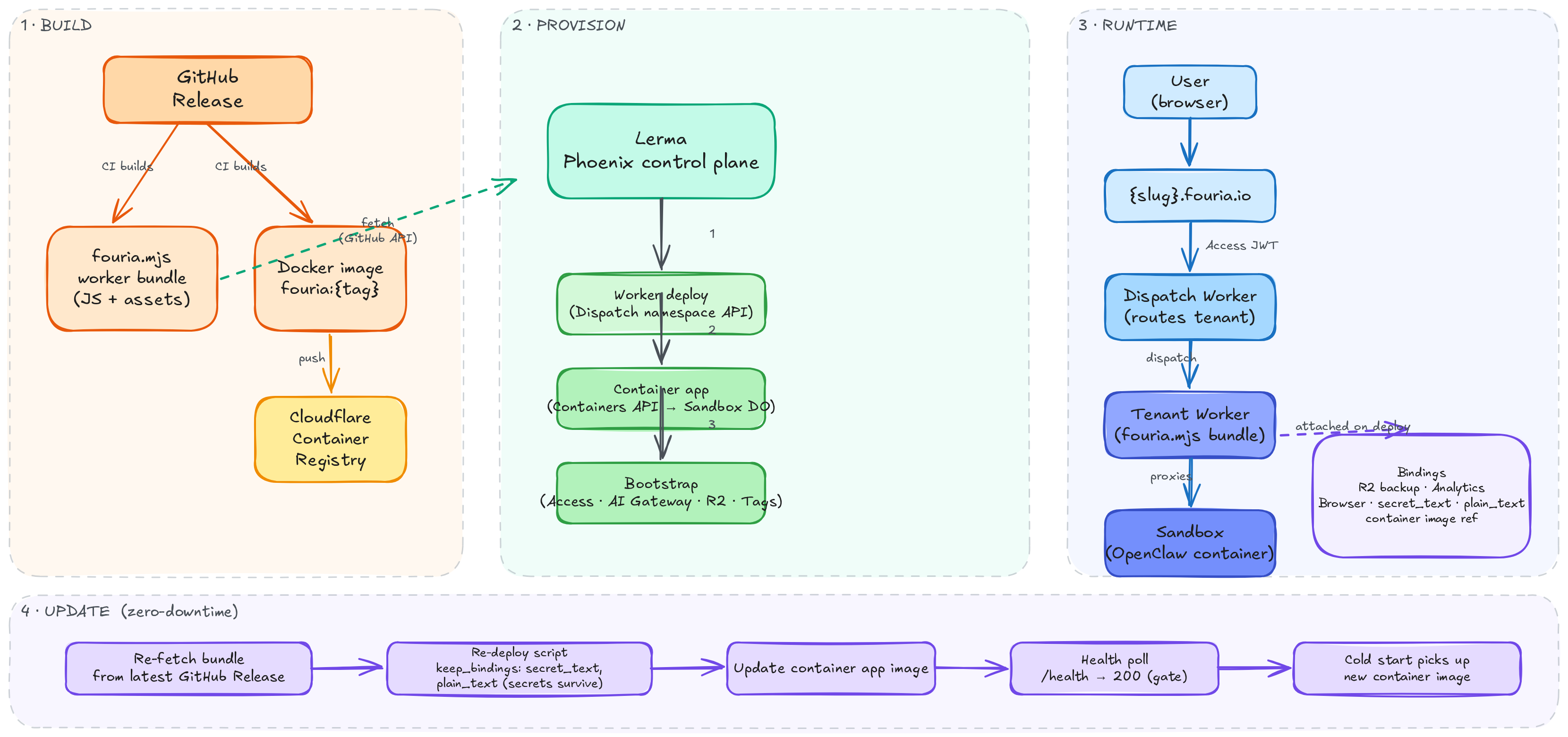
Open the editable Excalidraw file
OpenClaw Integration
How OpenClaw Data Structures Map to FourIA
FourIA wraps OpenClaw’s concepts:
| OpenClaw Concept | FourIA Representation | Managed Via |
|---|---|---|
| Gateway | Sandbox container process | start-openclaw.sh |
| Gateway token | MOLTBOT_GATEWAY_TOKEN env var | Worker Secrets |
| Auth profiles | Provider API keys (env vars) | buildEnvVars() |
Config (openclaw.json) | Generated by moltlazy patch | packages/moltlazy/ |
| Devices (pairing) | /_admin/ device management | routes/api/devices.ts |
| Agents | /_admin/ agents page | routes/api/agents.ts |
| Channels | /_admin/ integrations page | routes/api/integrations.ts |
| Memory/Wiki | /_admin/ knowledge page | routes/api/knowledge.ts |
| Skills | skills/ directory in container | start-openclaw.sh |
OpenClaw CLI in the Worker
The Worker wraps OpenClaw CLI calls. Example from src/routes/api.ts:
// API routes delegate CLI execution to the sandbox container.
// OpenClaw 2026.8.2: commands run on the gateway host auto-connect (no --url/--token);
// multi-agent commands take an explicit --agent. Example:
// Running: openclaw devices list --json
// Output parsing: case-insensitive "Approved" detection
CLI calls take 10-15 seconds due to WebSocket connection overhead. Always use the waitForProcess() helper.
Reading OpenClaw Docs
Before implementing any feature that touches OpenClaw configuration or APIs:
- Load the
openclaw-memory-architectordocumentation-lookupskill - Search docs.openclaw.ai for relevant config paths
- Map OpenClaw structures to FourIA types before coding
Local Development Setup
Prerequisites
- Bun (runtime, package manager, bundler) — always use Bun, never npm
- Node.js 22 (compatibility for some deps)
- Docker (for building the Sandbox container image locally)
- Wrangler CLI (Cloudflare Workers CLI)
- Cloudflare account with Workers Paid plan (for Sandbox containers)
Optional — Nix/direnv. The repository root ships a dev shell with Bun and Mix (for the root Mix workspace checks), and each app ships its own
flake.nixshell, so you can skip manually installing Elixir/Node/Bun/CLIs:# Repo root: Bun + Mix + Node 22 (default shell) nix develop . # App shells nix develop .#lerma # Elixir 1.20 + OTP 29 + Node 22 + psql + tofu + cloudflared nix develop .#fouria # Bun + Node 22 + wrangler + cloudflared + Playwright browsers # Or activate per-app with direnv (`.envrc` present in each app dir): cd apps/lerma && direnv allow cd apps/fouria && direnv allow
wrangler/cctr/plwrare resolved from the workspacenode_modules(bun install), not from Nix, to avoid version drift.
First-Time Setup
# 1. Clone and install
git clone <repo-url> fouria
cd fouria
bun install

# 2. Create .dev.vars
cp apps/fouria/.dev.vars.example apps/fouria/.dev.vars
# Edit .dev.vars with your API keys

# 3. Build all shared packages
bun run build:all

# 4. Run validation
bun run typecheck
bun run lint
bun run test

# 5. Prepare and run the Elixir workspace checks (inside `nix develop .`)
mix deps.get
mix workspace.run -t deps.get
mix check

# 6. Start development
cd apps/fouria
# Terminal 1: Frontend hot-reload
bun run dev
# Terminal 2: Worker backend
bun run dev:worker
Recommended AI Prompts for Development
When using AI tools to work on FourIA:
"Read docs/DEVELOPMENT.md first, then help me understand how [COMPONENT] works."

"Follow the contributing guidelines in docs/CONTRIBUTING.md while implementing this feature."

"Check the OpenClaw docs at docs.openclaw.ai for [config path] before writing code."

"Use the wrangler and cloudflare skills to verify my Worker configuration."

"Load openclaw-memory-architect skill before suggesting OpenClaw memory configurations."
Testing
| Scope | Command | Framework |
|---|---|---|
| All unit tests | bun run test | Vitest |
| Worker unit | bun run test --cwd apps/fouria | Vitest |
| Worker coverage | bun run test:coverage --cwd apps/fouria | Vitest + c8 |
| Dispatch unit | bun run test:dispatch | Vitest |
| Outbound unit ⚠️ | bun run test:outbound (deprecated) | Vitest |
| Moltlazy unit | bun run test --cwd packages/moltlazy | Vitest |
| Moltlazy E2E | bun run test:moltlazy:e2e | cctr |
| Plugin integration | bun run test:plugin:integration | Vitest |
| Full suite | bun run test:all | Vitest + cctr |
| Elixir workspace | mix check | Format + strict Credo |
| Elixir precommit | mix precommit | Credo + license audit + ExUnit |
AI skills for testing: tdd-workflow, ai-regression-testing, webapp-testing, e2e-testing
DevOps & Monitoring
| Tool | Purpose |
|---|---|
wrangler tail | Stream live logs from deployed Workers |
wrangler secret list | Verify secrets are configured |
| Docker | docker exec -it <container_id> bash to debug container |
| Analytics Engine | Query fourai_cost_metrics dataset via GraphQL |
Understanding Worker Logs
When the Worker starts, you’ll see boot sequence logs:
[api/status] existing process: proc_1781540935673_g0ymd1 running
[ERROR] [api/status] Port wait failed: Process did not become ready within 5000ms
[ERROR] Uncaught ProcessReadyTimeoutError: ... Waiting for: port 18789 (TCP)
These are normal during cold start. The gateway takes up to 3 minutes to become ready. The Worker retries automatically.